Remove everything after last or before first character in Bash and R

As simple as it is in Bash is not as easy in R to remove part of the string after character or even after last character.

In Bash, use can simply strip the last part of a string using:

$ var="hello.world.txt"
$ echo ${var%.*} # Remove all after last "."
hello.world
$ echo ${var%%.*} # Remove all after first "."
hello
$ echo ${var#*.} # Remove all before first "."
world.txt 
$ echo ${var##*.} # Remove all before last "."
txt

In R is a bit more complicated (unless you want to use special packages such as stringr). To do the same in R these are the commands you would have to use:

> vari <- "hello.world.txt"
> sub(".[^.]+$", "", vari) # Remove all after last "."
hello.world
> gsub("\\..*", "", vari) # Remove all after first "."
hello
> sub(".*?\\.", "", vari) # Remove all before first "."
world.txt 
> gsub(".*\\.","",vari) # Remove all before last "."
txt

samtools depth doesn’t count secondary mappings (samtools<1.10)

Recently, I have fallen in love with samtools depth. It’s fast, easy to use and does exactly what I want it to do – get coverage of individual bases in the BAM file.

After some experiment and figuring out why the heck I am missing some covered regions I have found out that default behavior of is NOT to count any of the following: secondary mapping, qc-fail and read duplicates.

Luckily, in the new version of samtools (>=1.10) you can allow counting of the mappings/reads by setting -g and then either list them separated by comma or using hex or decimal numbers.

For example to get all the regions and count secondary, qc-fail and duplicated mappings/read:

samtools-1.10 depth -a -d 0 -g SECONDARY,QCFAIL,DUP in.bam

Note: Brent Pedersen wrote mosdepth (publication here) which should be faster than samtools depth especially for large mappings (such as genome). From the GitHub: “per-base depth about 2x as fast samtools depth–about 25 minutes of CPU time for a 30X genome.“.

Edit: I have tested very briefly tested mosdepth and it doesn’t seem to be that much faster. I would even say samtools depth is faster. The testing set was transcriptome BAM file.

Convert gene symbols to UCSC id

This is a never ending story – converting one type of gene id to another. We have UCSC, RefSeq, Ensembl, and who know what other types of IDs.

To convert gene symbols (~gene names) to UCSC ID (knownGene) we can use many of the R tools or just use the strong mysql possibilities of UCSC.

To get gene symbols to UCSC IDs using MySQL command do:

assembly='mm9' ## Species and assembly you want to query
ucsc_ids="'uc007aet.1', 'uc007aeu.1', 'uc007aev.1'" ## IDs to convert
mysql --user=genome --host=genome-mysql.cse.ucsc.edu --disable-auto-rehash -e "SELECT DISTINCT knownGene.name, kgXref.geneSymbol FROM $assembly.knownGene INNER JOIN $assembly.kgXref ON knownGene.name = kgXref.kgID WHERE knownGene.name IN ($ucsc_ids);" > ucsc2symbols.txt

The answer was originaly posted by dariober at seqanswers.

Useful one-liners collection

Update: To see other one-liners, please check out my gist collection. It’s easier to make a small gist rather than write a “long” post here.

Finally, I have decided to put together a collection of useful one-liners before I forget them all. I will start slowly and add more on-the-fly. It will be a mixture of Bash, R, Perl, Python, and who knows what else.

Command line to remap a position sorted bam (from Heng Li tweet)

samtools collate -uOn128 old-pos-srt.bam tmpxyz | samtools fastq - | bwa mem -pt16 ref.fa - | samtools sort --threads=4 -m4G -o new-pos-srt.bam

The -uOn128 stands for -u uncompressed BAM output, -O output to stdout and -n INT number of temporary files [128]. For the bwa mem command the -pt16stands for -p first query file consists of interleaved paired-end sequences and -t INT number of threads [16]. So be careful as this assumes you have paired-end reads.

You might have to specify TMPDIR if your BAM is big or if you have access to a quick SSD disk. samtools fastq can also copy RG tags if you add samtools fastq -t copy RG, BC and QT tags to the FASTQ header line and/or samtools fastq -T TAGLIST copy arbitrary tags to the FASTQ header line.

Note for the bwa mem – there is a new version coming up called bwa-mem2, which should produce the same alignments as bwa mem but should be ~80% fasters. Right now (May 30, 2019), it doesn’t have a stable release yet, but if you like bwa mem it should be something to keep your eye on.

Get the number of reads (mapped) from BAM file

I always forget this and I always have to remind myself how to do this simple command so I rather put it down. If you want to get the number of reads from the BAM file, you cannot simply use samtools view -F 4 in.bam | wc -l or samtools flagstat in.bam because that would give you the number of mappings and not the number of mapped reads. To get the real number of mapped reads, you would have to do (taken from here):

samtools view -F 4 in.bam | cut -f 1 | sort | uniq | wc -l

This will work for both paired-end and single-end reads. If you have a paired-end and you would like to get only reads where both ends are mapped, you would have to replace -F 4 for -F 12.

Update: I have recently found that there is an even easier and, most importantly, faster solution (source here). You can use:

samtools view -F 4 in.bam | cut -f 1 | awk '!x[$0]++' | wc -l

Which makes it much faster. Compared to the sort | uniq this is almost 50% faster.

On BAM file with 149,909,118 input reads sort | uniq takes:
real 1m8.240s
user 2m57.097s
sys 0m18.001s


while awk '!x[$0]++' takes:
real 0m42.857s
user 2m30.028s
sys 0m18.179s

Replace multiple spaces (>=1) using sed

Countless times I needed to use my favorite sed to replace multiple spaces with tab. And countless times, I forgot how I did it the last time.

To keep it in my external memory, here we go:

text="hello     world"
echo "$text" | sed 's/  */X/g'

results in:

helloXworld

Please note there are two spaces if you use it with *. With one space it will much every symbol.

I often use it in conjunction uniq -c | sed 's/ *\t/g' | sed 's/^\t//g' to get a nicely formatted (=tab separated in my case) list of counts:

text=" 2   a\n1  c\n3 b"
echo -e "$text" | sed 's/  */\t/g' | sed 's/^\t//g' | sort -k1n
#1       c
#2       a
#3       b

The original post is here.

Note: If you don’t quote $text, echo will strip multiple spaces to just one.

text="hello     world"
echo $text
#hello world
echo "$text"
#hello     world

Insert line to the beginning of the file (first line)

Another handy sed command is to insert a line to the beginning of the file. I use it quite often to add a header to a table.

To add the line, just do:

echo -e "a\nb" | sed '1i transcript_id\tlength' 

You can also combine it with replacing the first line:

echo -e "a\nb" | tail -n+2 | sed '1i transcript_id\tlength'

Inspiration was found here.

Making correct RNA references

Often, I need to have a nice RNA reference for alignments or similar tasks. What sometimes happens is that the reference sequence you download from a database (for example hairpin.fa from miRBase, or tRNAs from GtRNAdb) contains the real RNA sequence – contains uracils and not thymines. By definition, this is a correct RNA sequence. But, if you want to do an alignment the same way you are used to do alignments to a genome reference you might get some unexpected results. They are often caused by Us in the sequnce. You will get some alignment from sequences that have fewer Us than number of mismatches but definitely the alignment results will be biased. My rule no. 1 when I start to work with any RNA-based reference is to make sure they have Ts and not Us and I also like to have them in one-line fasta format.

For example for miRBase miRNA hairpin reference:

$ wget ftp://mirbase.org/pub/mirbase/21/hairpin.fa.gz # Get the sequence
$ zcat hairpin.fa.gz | perl -pe '/^>/ ? print "\n" : chomp' | tail -n +2 | sed '/^[^>]/ y/uU/tT/' > hairpin.oneline.fasta # Convert to one-line fasta and replace all Us for Ts
$ grep -A1 "^>hsa" hairpin.oneline.fasta | sed '/^--$/d' > hsa_hairpin.fasta # Get only human hairpin sequences

Removing UMI duplicates from transcriptome alignment – more on Picard

This a follow up on my previous post. I was still wondering why Picard doesn’t remove duplicates from my RNA-Seq genome or transcriptome bam. I still haven’t sorted out the main problem but one of the issues I have “discovered” is that Picard ignores not primary alignment (SAM flag 256). When sorted by coordinate (classic samtools sort) it looks only for primary alignments (to be more correct – no not primary alignments) and removes duplicates from there. If you use only primary alignments, for example in variant calling, you would be fine. But if you would like to use multi-mapped reads, for example in RNA-Seq analysis using RSEM, you might not be getting the deduplicated bam file as you would like – the duplicates “formed” by secondary alignments would be still present.

If you want to remove duplicates from secondary alignments as well you have to sort the bam by queryname (=read name). They actually say this in the Picard MarkDuplicates manual but you can easily miss this. This is what they say: 

The program can take either coordinate-sorted or query-sorted inputs, however the behavior is slightly different. When the input is coordinate-sorted, unmapped mates of mapped records and supplementary/secondary alignments are not marked as duplicates. However, when the input is query-sorted (actually query-grouped), then unmapped mates and secondary/supplementary reads are not excluded from the duplication test and can be marked as duplicate reads.

Picard MarkDuplicates

When I tried to re-sort the bam file by the queryname using samtools sort -n I got an error from Picard saying “bam file not sorted properly by queryname” (or something like that. Well, the reason is samtools sort -n uses by default natural sort but Picard sort by queryname requires sorting by ASCII. You can achieve this by samtools sort -n as well but you have to add samtools view file.bam | env LC_ALL=C sort | samtools view -b > file-sorted.bam (as suggested here) and it might just work. Or simply use Picard SortSam SORT_ORDER=queryname and you are fine. Then, in Picard MarkDup add ASSUME_SORT_ORDER=queryname and it SHOULD remove the duplicates from the secondary alignments as well. The problem is that it still doesn’t. I can still see a lot of alignments which are duplicates but remain in the bam file… But it’s slightly better and I see less obvious duplicates kept in the bam file than before.  

Mystery of the Picard MarkDuplicates is still not solved and it just might not be suitable for RNA-Seq alignments at all. 

Removing UMI duplicates from transcriptome alignment

Two of the projects which I am working on contain UMIs in order to remove the PCR duplicates (one is CLIP-Seq, the other one is targeted RNA-Seq, both single-end sequencing).

The way I usually do this is that I first extract UMIs from the reads to a separate file (seqtk), then, using the reads with UMIs removed, I align them to a genome (STAR) and get both genome and transcriptome bams. Then, I add the UMIs as flag (fgbio AnnotateBamWithUmis) and remove or mark duplicates (picard UmiAwareMarkDuplicatesWithMateCigar).

I blindly trusted picard it will remove all the duplicates but then we (my colleague Kamila and I) observed something strange – the duplicates were successfully removed from the genome bams but not from the transcriptome bam. We clearly saw reads with identical mapping positions and identical UMIs (and identical sequences as well) left in the “filtered” bam. We were wondering why this happened.

I tried to extract only a smaller part of the bam and run picard again. Surprisingly, it removed a few additional duplicates but definitely not all of them. I thought it might be because of some strange bam sorting because of the number of transcript references in the bam header. I tried to re-sort the bam a million times but nothing worked. We tried to use a “simple” picard MarkDuplicateswithout UMIs (it should be even more aggressive), but again nothing. I tried to use fgbio GroupReadsByUmibut that one only supports only paired-end sequencing.

Update:fgbio GroupReadsByUminow (from 2020, ehm) supports single-end read as well.

In the end, I ended up with UMI-tools (umi_tools dedup) which works well for both genome and transcriptome bams. Now, I would like to replace the UMI extraction and fgbio bam annotation with umi_tools extract, put the UMI to the reads name and modify the duplicate removal. Unfortunately, umi_tools is extremely slow.

Still, I am not sure why picard didn’t remove the duplicates. My guess would be it has something to do with a lot of references in the bam header (one for each isoform ~200k), which is, for some reason, problematic for picard. But that’s just my guess. I didn’t manage to confirm or disprove this. If someone has some ideas please drop me a message.

P.S. A nice summary of UMIs and how to remove them is here at the UMI-tools.

Reference genome patches

I always wondered whether the genome patches (NCBI, Ensembl) are actually useful for something. To be honest, I always used the primary assembly to avoid “problems” with haplotype information (also described by Mark Ziemann here or in this question at Biostars, additional information here by Heng Li) but I have never looked at the patches up until now.

Recently my colleague asked me to locate part of a mRNA isoform which she cannot find in the reference genome (orange part). However, she can find the first part of the sequence (green part) in the reference genome (hg38) and the full length in the reference transcripts.

>mysterious_sequence
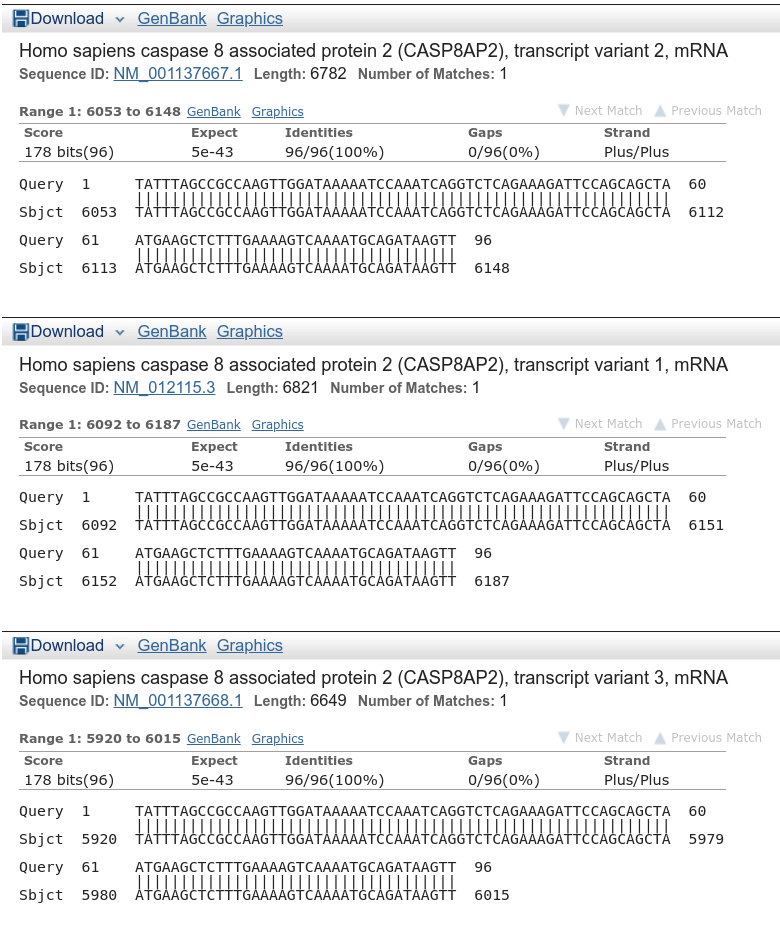
TATTTAGCCGCCAAGTTGGATAAAAATCCAAATCAGGTCTCAGAAAGATTCCAGCAGCTAATGAAGCTCTTTGAAAAGTCAAAATGCAGATAAGTT

So I BLASTed the sequence at the NCBI and indeed there is a full match with mRNA isoforms (Figure 1). But if I tried to locate the mysterious orange part in the reference genome I didn’t get anything.

transcripts
Figure 1: BLAST to transcript variants.

Then, I looked a bit lower to other hits and viola – the orange part was successfully BLASTed to p12 HG2121_PATCH patch of the reference genome (Figure 2). At the same time, it gave me a hit to the primary assembly where I can see the same “feature” as she saw initially – orange part of the sequence was missing.

genome
Figure 2: BLAST to the genome patch (top) and primary assembly (bottom).

The mystery was solved and I can start to think about including the patches to my favourite reference genome. Of course, I assume there will be a lot of other issues but the good thing is the patches shouldn’t change the chromosome coordinates.

Disclaimer

During the time as I have collected my notes and hints, I always tried to save as much used resource as possible. I am sure I have missed some. If you spot any of your figures, tables or text just let me know and I will add you to the used resources. I am not trying to steal anything from anyone but rather collect some useful information.

Also, some of the notes and hints I will transfer to this blog might be already outdated. I will try to update them as much as possible but sometimes (but really only sometimes) I am lazy and I will just put the things here as I have them in my beautiful .odt notebook.

The Journey Begins

After a long time storing all my notes and hints in an ugly text file I have decided to give them a nice look and open them for everyone. The blog will contain my notes, ideas, and summaries mainly from bioinformatics which are highly subjective and might not, and probably are not, always correct.

A theory is something nobody believes, except the person who made it. An experiment is something everybody believes, except the person who made it. — Albert Einstein.